Saturday, October 30, 2021

Hello world!

 Ok so I finally got Arduino to day hello world to the raspberry pi 

some things to not

the port name is ttyACM0

The default baud rate on the pi is high 57600

I need to add this line to the bash_rc file, so that I don't need to run it in every terminal

 source catkin_ws/devel/setup.bash
 

 The  arduino dev environemnt is still not ideal, i don't know why. I think it gets angry if you don't have each script in its own folder.


This tiny bit of work took me like 2 and a half hours because I had to do so much setup. 

But its progress!!


Sunday, October 17, 2021

Restarting

 Hey, I'm finally getting back into this project. I haven't really been working on it since my job keeps me busy. Anyways.


I've had to do a whole bunch of resetup stuff to be able to work on this again. Since my last update I have moved, started a new job and destroyed my computer. Also my cat chewed through the power cable of the robot.

First I had to solder the connections on the robot back together. 

Then I had to reinstall a whole bunch of stuff on my computer since I formatted my hard drive.

This included the Arduino IDE, putty, an ip scanner I use to find the pi etc.

I also got tired of the Arduino IDE since its barely usable when compared to Visual Studio Code that I use for work.

So I installed Visual Studio and managed to find a good Arduino extension.

Its called Visual Micro

https://www.visualmicro.com/

I was finally able to clone my repo again and start working on the project.

Right now im just working on getting hello world through the serial connection between my Arduino and my Raspberry pi. 

I'm having trouble getting the ros serial noetic package on the pi.

And I still have no idea how to deal with the encoder, in any case I've now made my code on github public :)

https://github.com/bus0v/robot

Sunday, March 28, 2021

todo list

 I think I have figured out how to make topics in ROS. I think they are created implicitly when you define messages in nodes or elsewhere. But I'll have to verify that.


Let's outline our todo list:

First I want to create a publisher node on the pi that can publish an array of 4 velocities (one for each wheel).

Then I want to make a subscriber node on the arduino that can receive it. Then I want the arduino to be able to break that information down into commands for the motor controller. So if I get an array of [-1.0, +2.0, -1.0, +2.0] I want to translate that from cm/s to a pwm value and a direction. The PWM value is from 0 to 255, and I don't actually know how fast the robot can go as of right now. It is underpowered, I am not using 12V but more like 9.5. My batteries are 8*1.2 so my best voltage is 9.6. So I have no idea how fast it will go under all of the weight.

To translate all of that stuff I might want a library as my code is getting increasingly ugly. There are some L298n libararies out there, but I am unsure about them.

Then once the arduino can run based on pi input, I will need to make another node that reads values from the encoders. Then I will create a new message type that can send an array of four integers to the pi. I got in touch with the company that sells the robot and they said that there are 11 pulses per turn in the motors. I find this very puzzling since the encoder library I'm using gave me 1200. 

So basically I will create a publisher that will send an array to another node on the pi. This node on the pi will then do the math and calculate stuff like speed and position.


This is where the fun begins! 

Then I can use that to create a PID control node that will correct the robot speed based on the odometry data!

Friday, March 19, 2021

ROS node communication

Alright, its been a while since my last update. I have started a new job and moved to a different city, so I have not been able to work on the robot that much lately. I'm also hitting a difficult part of the process. I can now start thinking about the different nodes in the robot operating system and the computation that each of them will do.


Last time I left off trying to figure out serial communication. The way that it is done between the raspberry pi and the arduino is to make the arduino into a node on the ROS. In ROS the computation is distributed across nodes, which allows us to compartmentalize certain functions of the robot. In my case the Arduino is responsible to spinning the motors and reading the encoders. It would also be smart to connect my ultrasonic distance sensor to it, but I don't want to rewire it. 

So the arduino for now is just going to send the data from the magnetic encoders on the wheels. Each encoder has about 200 ticks per revolution. That is a relatively small number and I can send it using what is called a message in ROS. 

You see, the nodes in ROS communicate via messages, that have a certain format. Similar to conversations between people the messages pertain to a topic. For example the topic could be velocity and the message is 2 m/s. 

So I will use a standard message type int16 to send numbers in range of -200 to 200. Then another node on the raspberry pi will receive it and translate it to stuff like distance travelled. If I have the time stamped on these messages I will also be able to figure out how fast the robot is going assuming the wheels don't slip.

Saturday, February 20, 2021

ROS adventures

 At first when I tried to install ROS I was very confused, because I was under the impression that the Raspberry pi was a very unique platform that needs it's own approach. So far I used Raspian Buster on it.

This led to a lot of confusion with me trying to install old ROS distributions such as Kinetic and Melodic. Because those are the only ones that Raspberry pi tutorials are made for. On the ROS wiki the distributions are said to support a limited number of architectures and operating systems. When I looked up what architecture the Raspberry pi has I got this result:


aarch

Which didn't seem to be listed. However it turns out that it is the same as arm64 architecture! This was a huge break through, because it meant that I could use any operating system as long as it had an arm64 port. I picked ubuntu, because it would allow me to run the latest ROS distro as of Febuary 2021 which is Noetic Ninjemys. 

As a side note noetic means relating to intellect or mental activity, and ninjemys is an ancient turtle species that is  literally translated to ninja turtle. Pretty neat!

I chose to install ubuntu 20.04 LTS server, because I'm mostly going to work with the command line. Hopefully I don't regret this decision, but if I do I can always install some more GUI stuff on it. This install was pretty challenging, because I wanted to do it headless. Meaning I didn't have a monitor setup, so I couldn't verify what was going on at first. I wanted to edit the network-config file on the SD card of the raspberry pi and enable ssh on it, so when I turned it on it would be ready to do and I could ssh into it. This proved difficult however as the wifi adapter refused to turn on. After a lot of failed attempts I gave up and plugged in my monitor. 

It turns out I forgot a quotation mark, which was messing up the network-config file. This surprisingly didn't let me log in to the pi at all. After I fixed it, it still wouldn't log into the Wi-Fi however. To solve that I edited the netplan YAML file on the ubuntu server after logging into it with a monitor and keyboard. 

This YAML file was terrible as it was super finicky with indentation. What I discovered is that each indentation had to be 3 spaces per seniority level. So something like this.

human:

   engineer:

      peter:

After I fixed this the netplan finally was able to be generated and applied. After that I ran

sudo apt update

sudo apt full-upgrade

sudo reboot

And finally for the first time it booted up with Wi-Fi! I was very happy, now I was able to ssh into the robot from anywhere in the house.

Then I was able to easily install ROS following this tutorial:

http://wiki.ros.org/noetic/Installation/Ubuntu

This is a huge breakthrough as I'm finally getting to the part that I want to do, the robot programming. ROS is  a very valuable skill to have in the robotics industry and my hope is that I can make myself more employable through this practice. The next step is to figure out serial communication via ROS and try to set up some nodes.

Monday, February 15, 2021

Improving the wire mess

 Today I also started the task of improving the wiring situation. Currently there are way too many wires and the thing looks ugly as sin. I managed to find an old yogurt container that fit the dimensions of the robot nicely. I decided to move the arduino and the raspberry pi to the top, because those are the components that I interact the most, and hide the ugly motor controller mess under the contrainer. I also made a small plow that can be used for moving objects and a little front face to mount the ultra sound sensor and the camera.


 One problem that I have yet to solve is the battery placement. I want it to be removable, but I also want it to be secure. It is by far the heaviest part of the circuit and I don't want it to fall off when the robot accelerates quickly. 

So far I have it taped onto the back of the robot. But one new improvement is that I have added a power switch! This make the whole thing a lot safer now.

Encoders

 If I hope to be able to locate my robot, I need some sort of sensor, for it to know where it is. When I bought the chassis I decided to get something with encoders. 

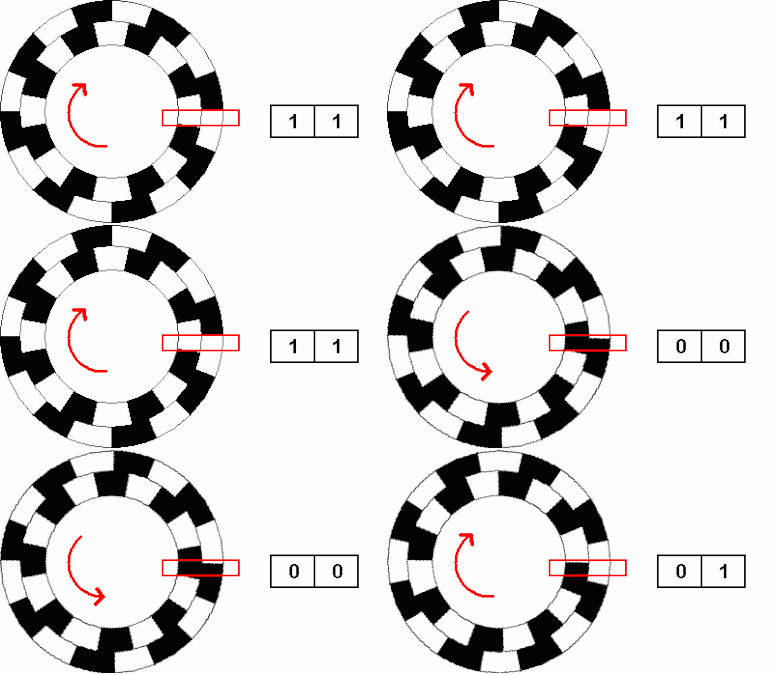
Magnetic encoders work by sensing a change in magnetic field as a disk attached to the motor rotates. The type that I have is called a 2 phase encoder. 


 One ring represents signal A and the other represents signal B. Based on the positions of the rings the logic of the signals will tell me if my robot's wheels are going backward or forward.

The problem is that I have 4 motors, and each of them has an encoder. I am already using 3 wires per motor, just to drive them. And with the encoders I will need another 2 wires per motor. 

I can use the analog pins as digital inputs, but I am still a bit short. My hope was to use pins 0 and 1, but they are ties to the serial communications. So basically I can either talk to my raspberry pi or I can have these two pins. Great... 

Since I don't want to buy another bigger arduino, I found another solution. I can use a shift register! This device would allow me to power 8 pins as digital output, while only using 3 on my arduino. Luckily I have a 74HC595 chip laying around.

The pins that are driven by the shift register will technically react slower, but the delay is so small that it shouldn't be noticeable.

So next time I will need to figure out how to use that, put some of the motor pins on there, and plug the encoder into the digital pins that are now available.

Other than this minor hickup, I have gotten all of the encoders to report data. This is amazing news. With this done, I can start getting into ROS more and using the data from the encoders to control the robot.

Speaking of which, I have managed to get basic serial communication to happen between the raspberry pi and the arduino, I wrote a simple script, where the arduino spits out the position of the wheel and the raspberry pi can read it. Currently I am controlling the raspberry by via ssh, so I can read the output on my nice computer screen.

NEW Project Autonomous underwater vehicle!

  I have been more and more interested in Autonomous Underwater Vehicles and ocean exploration. I live on the coast with direct access to th...